Booking & payments / 9 min read
Online Booking for Solo Salons: A Practical Guide
A step-by-step guide for solo salon owners choosing online booking, deposits, reminders, cancellation rules and a customer list they continue to own.
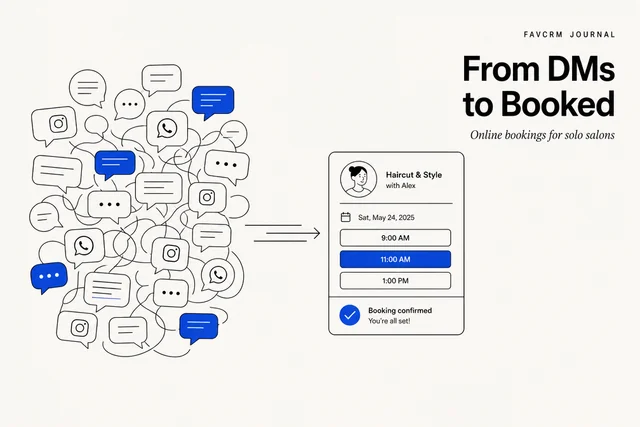
You are running a salon from your DMs
You are a solo nail tech, lash artist, hair stylist, brow specialist, or barber. One to three chairs. No receptionist. You take bookings through Instagram DMs, WhatsApp, the occasional phone call, and a paper diary that lives in your bag.
It works. It just doesn’t scale, and it costs you real money in three ways:
- No-shows. Clients ghost because nothing is at stake. An empty chair on a Saturday afternoon is gone forever.
- Double-bookings. You wrote 3pm in two places, both clients show up, one leaves angry.
- Ping-pong. Every booking is six messages back and forth. “Hi, do you have Thursday?” — “Yes, what time?” — “5pm?” — “Already booked, 6pm?” — “Hmm, 7?” — “Yes, confirmed.” Repeat 30 times a week.
The fix is one online booking page where clients self-serve, pay a deposit, and get a confirmation — without you typing a word. This guide walks through what that actually looks like, what to set up, and how to ship it in an afternoon.
What “online bookings” actually means for a solo salon
The phrase gets thrown around loosely. There are really three different things, and only one of them solves your problem.
Your own booking page. A URL you put in your IG bio. Clients click, pick a service, pick a slot, pay a deposit through Stripe, get a confirmation. The client is yours, the booking is yours, the customer record lives in your system.
A marketplace listing. You list your studio beside other providers. It may help discovery, but fees, customer ownership and the ability to continue the relationship vary by platform. Check the current terms before making a marketplace your main booking route.
An Instagram link-in-bio scheduler. Tools like Calendly were built for sales meetings. They handle a 30-minute slot with one person well. They don’t natively handle deposits, service variants, salon-specific reminder cadence, or 繁體中文.
For a solo salon, your own booking page gives you more control over the customer list, policies and follow-up. Marketplaces can still be an additional discovery channel.
5 things a booking system must do for a solo studio
Cut through vendor marketing. These five things matter; almost everything else is noise.
1. Take a deposit at booking
Deposits can reduce casual bookings and make the cancellation policy concrete. The right amount depends on service value, lead time and how costly an empty slot is.
This requires a suitable payment provider connected to the booking page. Show the amount, refund terms and remaining balance before the customer confirms.
If the booking tool you are evaluating doesn’t take deposits, stop evaluating it.
2. Send reminders the client actually sees
Use the channel the customer agreed to receive and is likely to notice. In Hong Kong, that may be WhatsApp; email or SMS can still be appropriate in other workflows.
Start with one reminder that gives enough time to reschedule, then adjust from actual no-show and change data. More messages are not automatically better.
3. Show live availability — no double-bookings, no DM ping-pong
The booking page must read from a single source of truth so two clients cannot book the same slot. That sounds obvious; it is the failure mode of the paper-diary system.
A good booking tool also collapses the back-and-forth: the client sees what is actually free, picks it, done. The “is Thursday free?” message dies.
4. Sync with your calendar (Google 2-way)
You already live in Google Calendar — for personal life, for off-days, for the occasional dentist appointment. The booking system should write new bookings into your Google Calendar automatically, and read your manual blocks back, so a slot you mark off in Google never appears as available on the booking page.
Two-way sync is the keyword. One-way (booking → Google but not back) leaves the door open for double-bookings when you block time manually.
5. Build a customer list you own
Every booking should automatically create or update a customer record: name, phone, email, service history, deposit history. That list is your business’s actual asset. It is what lets you message a quiet client in month four, run a small win-back offer, or notice your regular client hasn’t been in for six weeks.
If a “booking system” doesn’t build this customer list — or if the list lives on a marketplace and isn’t exportable — it is solving the wrong problem. Marketplaces typically own the relationship with the client they refer. Your own booking page does not.
Step-by-step: get bookings live in an afternoon
A realistic timeline if you set aside one focused afternoon.
1. Pick a booking system
Test against the five criteria above. Specifically: can it take deposits through a suitable provider, send reminders on the agreed channel, prevent calendar conflicts, build an exportable customer list, and explain its pricing clearly?
If the answer to all five is yes, the rest is configuration.
2. Set up your services
For each service: name, duration, price, deposit amount (or percentage). Keep the list short to start — your 5 most-booked services. You can always add more next week. Long service menus paralyse clients; tight menus convert.
For each service also decide whether it needs a buffer (the 10 minutes between two facials to reset the room). A booking system worth using lets you set this per service.
3. Connect a payment provider
Choose a provider available to your business and confirm its onboarding, payout timing, refund process, dispute handling and fees. The booking page should use a hosted or compliant payment flow so the salon does not handle raw card details itself.
4. Turn on reminders
Switch on the reminder channel customers have agreed to use. Include the service, date, time, location and a clear change route. Review delivery and no-show results before adding another reminder.
5. Connect Google Calendar
Authorise the booking system to read and write your Google Calendar. After this is done, the booking page respects your manual blocks (vacation, dentist, kid pickup) without you having to remember to block them in two places.
6. Share the page
Put the booking URL where your clients already are.
- Instagram link-in-bio (the highest-converting placement for most personal-care studios)
- WhatsApp business profile, in the auto-reply for messages outside business hours
- Google Business Profile, as the “Book” button
- Email signature
- A small QR code printed at your station, for in-person rebooking
The URL itself should be on your own domain or a clean subdomain. Long marketplace URLs with tracking parameters do not look like the studio’s brand.
Common questions solo owners ask
A short FAQ. None of these is a deal-breaker once it is set up correctly.
How much deposit should I take? Start from the cost of an empty slot, the service value and what customers consider reasonable. Test one rule, publish it clearly and review both no-shows and completed bookings.
How long should the cancellation window be? It should give you a realistic chance to refill the slot. State the deadline, refund or credit treatment and rescheduling terms before payment.
Do clients need to register or create an account? Usually not. Keep the first booking flow to the information required for the service, confirmation and payment. An unnecessary account step adds friction.
What about customers who cannot pay online? Decide whether to offer another payment or confirmation route, and make the exception visible to the team. Apply the published policy consistently.
What about clients who only use direct messages? Use a clear quick reply with the booking link and explain that it shows current availability. Keep a human route for service questions and accessibility needs.
Where FavCRM fits
FavCRM’s booking and payments module connects services, availability, deposits and reminders to the same customer record used for WhatsApp follow-up. A solo studio can begin with the booking workflow, then add other modules without moving the customer list.
During a demonstration, use one of your real services and check the payment, reminder, cancellation and rescheduling experience from both the customer and operator side.
The punchline
A solo salon does not need a system that does everything. It needs a system that does five things well: deposits, reminders, calendar sync, customer ownership, and a clean booking page. Configure it once in an afternoon, point your Instagram bio at it, and let your clients self-serve.
The rest is doing great work in the chair.
For the wider setup, read the online booking systems guide and Hong Kong WhatsApp CRM guide, or book a demonstration.