AI work coordination / 6 min read
AI Meeting Notes for CRM: Transcript to Follow-Up
See how AI meeting notes can become structured customer records, tasks and approved follow-up instead of another transcript left in a separate app.
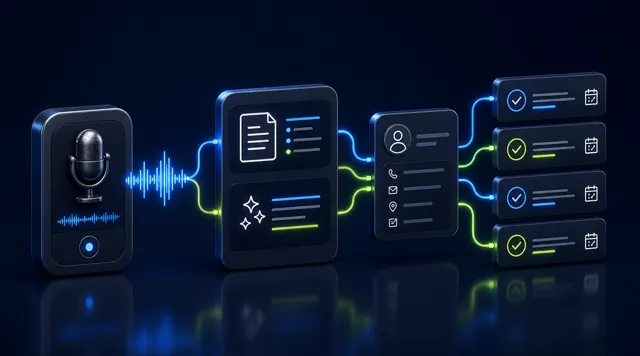
Customer meetings contain exactly the information a CRM needs: what the customer wants, what the team promised and what should happen next. Yet many meeting tools produce a transcript that remains detached from the customer record.
The useful outcome is not more text. It is a reliable handover from conversation to structured work.
A transcript is not a customer record
A transcript answers “what was said?” A CRM-ready meeting note also answers:
- Who was the meeting with?
- Which account, deal or service does it concern?
- What decisions were made?
- What has the team committed to?
- Who owns each next action?
- When should the customer hear from us?
Without those links, a searchable transcript can still become another information silo.
What an AI meeting workflow should produce
| Output | Why it matters |
|---|---|
| Concise summary | Gives the next colleague the essential context |
| Decisions | Separates agreed outcomes from general discussion |
| Action items | Turns promises into assigned work |
| Customer fields | Updates relevant preferences, needs or timing |
| Follow-up draft | Helps the owner respond while context is fresh |
| Source link | Lets a reviewer check the original conversation |
The AI should propose these outputs, not silently rewrite the customer record without trace.
A practical workflow
1. Capture with consent
Decide how participants are informed and how recording or transcription consent is handled. The correct process depends on the meeting channel, company policy and applicable law.
Only capture what the business needs. A full recording may not always be necessary if a structured note is enough.
2. Match the correct customer
The system should use reliable signals such as calendar participants, phone number, email address or an existing deal. If two records are plausible, it should ask rather than guess.
3. Extract facts, decisions and actions separately
These are different types of information. “The customer mentioned August” is not the same as “Both parties agreed to launch on 12 August.”
A good review screen makes this distinction visible.
4. Assign owners and dates
“Send proposal” is not yet an operational task. “Alex to send the revised proposal by Friday” is.
If the owner or deadline was not stated, the system can suggest one but should mark it as a suggestion.
5. Draft the customer follow-up
The draft should reflect the actual decisions and open questions. For Hong Kong service businesses, this may be a concise WhatsApp reply rather than a long email.
The account owner should review the tone, promises, prices and dates before sending.
6. Keep an audit trail
Store the source, generated summary, edits, approval and final message. This makes it possible to understand how the record changed and correct mistakes.
What to test before choosing a tool
Run a meeting containing names, dates, one ambiguous request and two action items. Then check:
- Did the tool attach the note to the correct customer?
- Can it distinguish discussion from a confirmed decision?
- Does it preserve names, amounts and dates accurately?
- Can a reviewer compare the summary with the source?
- Are tasks assigned to the correct person?
- Does the follow-up draft avoid inventing promises?
- Can sensitive fields or actions require approval?
Accuracy on your normal meetings matters more than a polished sample supplied by the vendor.
Common failure modes
The summary sounds good but loses the commitment
Fluent prose can hide a missed date or owner. Use structured fields for decisions and actions, not a paragraph alone.
Notes are attached to the wrong contact
Incorrect customer matching is worse than an unfiled note. Ambiguous matches should go into a review queue.
Every sentence becomes a task
Too many low-value tasks make the system unusable. Extract commitments and concrete next steps, then let the owner confirm them.
The follow-up is sent too quickly
Customer-facing messages can contain pricing, timelines or sensitive context. Drafting can be automatic; sending should follow the business’s approval rules.
From meeting memory to business continuity
AI meeting notes are most valuable when they reduce the gap between a good conversation and consistent execution. The meeting should leave behind a customer record that another teammate can understand and a set of actions that can actually be completed.
FavCRM’s AI work coordination module is designed around that handover: prepare summaries and follow-up from customer context, connect them to the customer record, and keep important actions under human approval. Book a demonstration to review a representative workflow.