Customer retention / 7 min read
Restaurant Loyalty, Points & Prepaid Top-Ups on Eats365 POS
How 1–10 outlet Hong Kong restaurants turn Eats365 POS into a repeat-visit and prepaid cash-flow engine: zero-app QR member cards, Pay with Points, Stripe and QFPay mobile top-ups, and automatic void rollbacks. Contact us for a tailored quote.
For most Hong Kong restaurants, getting a guest to try the food once is rarely the hard part. The real margin leak happens right after the bill: first-time diners walk out without leaving a reachable contact, delivery marketplaces take 20%+ per order, and rent plus supplier invoices come due before weekday tables fill up. Asking cashiers during a busy lunch rush to pitch a heavy app download or stamp paper cards only slows down the queue and leaves you with zero actionable customer data.
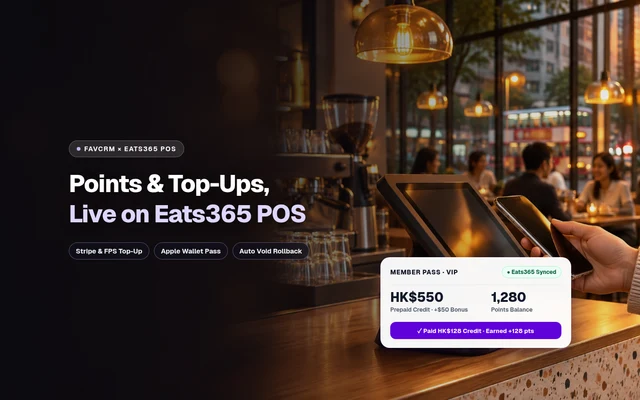
If your dining room already runs on Eats365 POS, you do not need to build a heavy custom app from scratch or keep a separate reconciliation tablet beside the till. FavCRM connects directly with Eats365 POS so your guests get a zero-app mobile member pass, instant points rewards, and prepaid wallet top-ups—turning everyday dining into measurable repeat visits and upfront working capital.
Key takeaways for Eats365 operators:
- Zero app download: Guests join via QR code in seconds using a browser pass or Apple Wallet / Google Wallet.
- All handled inside Eats365 POS: Staff look up members by phone or QR, tender with prepaid credit, apply Pay with Points, redeem coupons, and award points automatically on settlement.
- Tailored to your outlet count: Flexible rollout for single venues or multi-branch groups—message our team for a custom quote matched to your Eats365 POS setup.
3 High-Return “Points + Top-Up” Playbooks for Hong Kong F&B
Paper stamp cards rarely motivate guests to leave cash on deposit ahead of time. When you pair stored prepaid credit with targeted points multipliers inside your POS workflow, each dining concept can solve its exact revenue bottleneck. The numbers below are illustrative scenarios you can adapt to your own ticket size:
1. CBD Lunch Cafes & Cha Chaan Teng: Faster Till Turnover, Locked-In Weekday Regulars
Office workers in Central, Causeway Bay, or Kwun Tong hate waiting for small change or fumbling through slow login screens at 12:45 pm. As an illustrative scenario, a weekday cafe offers “Top up HK$500, get HK$50 bonus dining credit, plus regular drink points on every order.”
Regulars top up on their morning MTR commute via FPS or Apple Pay. At lunch pickup, one quick QR scan on Eats365 POS deducts the balance and credits their points in seconds—cutting queue friction while making sure tomorrow’s lunch spend stays with you instead of drifting two doors down.
2. Dinner Hotpot, Izakaya & Casual Dining: Pull Demand into Mon–Wed Nights
Weekend tables fill themselves; Monday to Wednesday emptiness is what squeezes monthly profit. As an illustrative scenario, a dinner concept promotes “Top up HK$2,000 for HK$200 bonus credit + a Monday–Wednesday complimentary appetiser voucher + 1.5x points on early-week visits.”
Once a diner holds HK$2,200 in prepaid balance and a weekday dish voucher, group dinners naturally gravitate back to your dining room on slower evenings—stabilising kitchen prep, staffing, and fixed rent coverage.
3. Multi-Outlet Groups (1–10 Locations): One Shared Guest Wallet, Clean Branch Settlement
Growing brands across Hong Kong Island, Kowloon, and the New Territories often lose regulars when store credit works only at the branch where it was purchased—or lose hours reconciling cross-branch balances in spreadsheets every month.
With FavCRM linked across every branch’s Eats365 POS, diners carry one digital pass to view points, claim vouchers, and spend prepaid credit across all outlets, while head office gets clear per-branch ledgers showing where funds were collected and where meals were redeemed—powering group-wide loyalty retention.
Day-to-Day Floor Workflow: From QR Join to Eats365 Settlement
Adding membership and prepaid wallets should never feel like extra admin for floor staff. Once connected, daily service runs in five clear steps:
-
15-second QR onboarding—zero app download required Diners scan a table stand, counter placard, or receipt QR code, verify their mobile number once, and unlock their mobile pass immediately in Safari/Chrome or Apple Wallet. See the full setup flow in our digital loyalty card guide.
-
24/7 online self-top-up (Stripe / QFPay) plus counter cash support Guests choose a top-up pack anytime from their phone and pay via Stripe (cards, Apple Pay) or QFPay (FPS and local Hong Kong wallets) with funds settling directly to your connected merchant payment account; credit lands immediately. When a regular prefers paying cash or local terminal at the counter, an authorised manager or supervisor records the top-up directly in the FavCRM merchant back office so it reflects instantly at checkout.
-
Instant lookup, wallet tender, Pay with Points, and coupon validation inside Eats365 POS At settlement, staff tap the guest’s phone number or scan their member QR directly in Eats365 POS to see prepaid balance, available points value, and eligible vouchers. Cashiers apply full or partial store credit, Pay with Points discounts, or free-dish vouchers in the same tender flow—and net spend points post automatically when the check closes. Pair this with tiered rules inside FavCRM Memberships and Loyalty Rewards.
-
Automatic void and refund rollbacks keep accounts spotless Fast-paced dining rooms inevitably enter occasional mis-keys or split-bill corrections. Whenever Eats365 POS processes a void or refund, prepaid credit, point discounts, and vouchers redeemed on that check automatically return to the member’s account while earned points from that bill are rolled back—eliminating manual spreadsheet adjustments.
-
Win back dormant wallet holders with guarded WhatsApp campaigns Do not wait around hoping diners remember their leftover credit. Group regulars with RFM segmentation to spot guests holding HK$300+ unused credit who have not visited in 30 days, then trigger targeted win-back messages using FavCRM WhatsApp—complete with built-in approval previews so nothing broadcasts to the wrong segment.
4 Restaurant Loyalty Approaches Compared: Why Skip Building a Custom App?
For independent operators and 1–10 store groups, picking an overly heavy stack drains cash without lifting repeat covers:
| Approach | Commercial & Rollout Model | Guest Signup Friction | Eats365 POS Sync | Retention & Top-Up Visibility |
|---|---|---|---|---|
| Paper stamp cards / plastic VIP cards | Ongoing reprint cost, zero digital extensibility | High (forgotten cards never convert) | None—manual counting and stamps | Zero data; impossible to follow up |
| Custom-built branded mobile app | Long custom build cycle plus ongoing maintenance | Very high (diners rarely download in queues) | Requires custom POS middleware | Poor download rate keeps active base tiny |
| Third-party deal & voucher marketplaces | Per-order revenue share that erodes dine-in margin | Medium (traffic stays on marketplace) | Usually needs a separate side tablet | Marketplace owns customer relationship |
| FavCRM × Eats365 POS | Tailored quote by outlet count & modules (ask for pricing) | Near-zero (15-sec QR + Apple Wallet) | Native lookup, credit tender, Pay with Points, vouchers & auto void rollback | Full top-up/points audit trail + RFM WhatsApp win-backs |
3 Margin-Safe Ways to Design Your Top-Up & Points Program
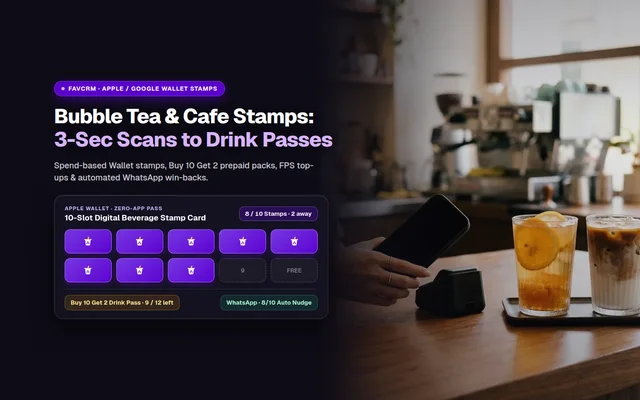
Smart loyalty pays for itself long before a single bonus dollar is spent. Drawing from patterns across our restaurant customer retention strategies (or for high-frequency beverage counters, our Hong Kong bubble tea & cafe digital stamp card and Drink Pass playbook), keep these three guardrails in place:
-
Anchor entry packs around 2–3× average ticket size If your lunch ticket is HK$75, pitching a HK$3,000 package creates sticker shock. Setting starter packs at HK$300–HK$500 for cafes or HK$1,500–HK$2,500 for dinner dining feels natural and converts far more everyday diners into prepaid regulars.
-
Reward with high-perceived, low-COGS perks instead of flat 20% storewide discounts Cutting bills by 20% slices straight through net profit. Pairing “Top up HK$500 + HK$50 credit” with a “Mon–Wed signature drink or appetiser voucher” costs pennies on COGS while giving diners an unmistakable win—and shifts visits to your quietest nights.
-
Award spend points at POS settlement rather than double-dipping on deposit Keep your rules crystal clear: online top-ups unlock bonus credit or tier perks, while base loyalty points calculate cleanly at Eats365 POS settlement on qualifying spend. Guests understand it immediately, and accounting avoids double-reward leakage.
Frequently Asked Questions (FAQ)
Do diners have to download a dedicated restaurant app to collect points and top up?
No. Guests scan a table tent or receipt QR code, verify their mobile number once, and immediately open their digital membership card in a mobile browser or Apple Wallet and Google Wallet to view points, claim vouchers, and top up online with zero app download friction.
Will connecting loyalty and top-ups slow down our Eats365 POS cashier queue at lunch?
No. Cashiers look up the guest directly inside Eats365 POS by phone number or member QR scan, view available prepaid balance, redeemable points, and vouchers on one screen, and tender the bill immediately without juggling a second tablet.
Can guests who pay cash or local store payment at the counter also add credit to the same wallet?
Yes. Customers can self-top-up 24/7 online via Stripe or QFPay (supporting local methods such as FPS), while authorised managers or cashiers can also post counter-paid top-ups immediately in the FavCRM merchant back office so the balance is ready on Eats365 POS.
What happens to deducted credit or earned points if a waiter voids or refunds an Eats365 order?
When an order is voided or refunded on Eats365 POS, the integration automatically returns deducted prepaid credit, point discounts, and redeemed vouchers to the guest wallet while rolling back the points awarded from that bill.
How is the FavCRM and Eats365 POS membership and prepaid wallet solution priced?
Pricing is tailored to your number of outlets, selected modules such as points loyalty, prepaid wallets, and WhatsApp retention workflows, and your Eats365 POS store setup. Message our team on WhatsApp with your restaurant concept and branch count to get a custom quote and live walkthrough.
Ready to See Points & Prepaid Top-Ups Working Live on Eats365 POS?
If your restaurant runs on Eats365 POS and you want to roll out zero-app member passes, Pay with Points, and mobile prepaid wallets across 1 to 10 branches, message our team on WhatsApp for a custom quote and live walkthrough (+852 9319 7731) matched to your service format and outlet count.