AI work coordination / 8 min read
Connecting Claude, ChatGPT, and Cursor to Your Booking Calendar with MCP
How to connect Claude, ChatGPT, or Cursor to a live appointment calendar via OAuth 2.1 Model Context Protocol—comparing read-only view scopes, booking write ceilings, and CRM Approval Guard.
An MCP booking server lets AI assistants such as Claude, ChatGPT, and Cursor inspect live service availability, read customer bookings, and reschedule appointments through scoped OAuth 2.1 tools rather than screen-scraping or raw master API keys. Instead of pasting static spreadsheets into chat prompts or opening up your entire CRM and billing settings to an experimental integration, the Model Context Protocol separates what an assistant can read from what it can change—right at the token and endpoint boundary.
For clinics, beauty studios, coaches, tutors, and multi-room venues, the win is practical: your team can ask an assistant “Which Pilates slots are still open tomorrow afternoon?” or “Move Rachel Chen’s Thursday consultation to Friday morning” without building bespoke webhooks or compromising least-privilege security. Still, connecting an assistant to a real calendar carries real operational risk if permission boundaries are vague. This guide breaks down how AI booking MCP permissions work, where confirmation stays agent-side versus server-side, and how to connect Claude or Cursor cleanly in under two minutes.
Why raw API keys and screen-scraping fail on live appointment calendars
Service teams usually try two brittle shortcuts before adopting an MCP booking server, and both break down quickly under real front-desk traffic:
- Static ICS feeds miss business rules. A synced Google or iCal calendar feed shows blocked time, not service durations, practitioner skills, buffer intervals, guest checkout rules, or paid status. Asking an AI assistant to “find an open slot” from raw busy blocks routinely produces double-bookings or invalid durations.
- Unscoped API keys widen the blast radius. Copying a single workspace-wide bearer key into three different desktop assistants means any connected tool—or misread prompt—could touch invoices, bulk broadcasts, client exports, or staff roles alongside the booking calendar.
- Browser clicking breaks on layout updates. Computer-use scripts driving a merchant web portal cannot check availability transactionally and stall whenever filters or timezone selectors shift.
Connecting over OAuth 2.1 Scoped MCP replaces those workarounds with typed server tools discovered dynamically via tools/list, bound to an active workspace owner or administrator consent flow using PKCE (S256).
Three MCP endpoints, three distinct trust boundaries
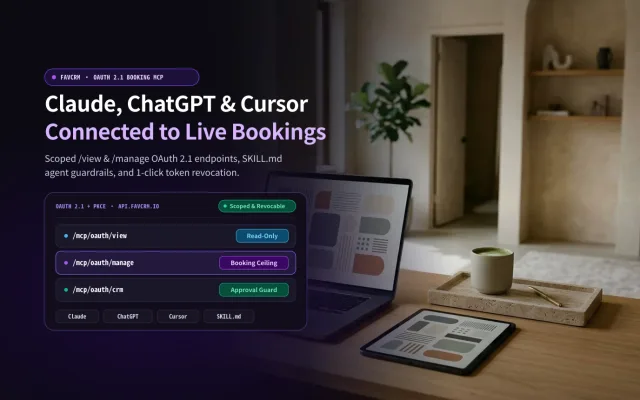
Not every workflow needs write access, and a solo instructor’s booking assistant should never share permissions with bulk WhatsApp campaigns or discount overrides. FavCRM separates capabilities across dedicated resource URLs on https://api.favcrm.io:
| Endpoint URL | Included scopes | Plan availability | Execution model & safety boundary |
|---|---|---|---|
https://api.favcrm.io/mcp/oauth/view |
bookings:read, contacts:read |
Starter (US$0), Simply Booking (US$20/mo), FavCRM Pro (US$29/mo) |
Strictly read-only. Lists bookings, availability, services, staff, and existing client profiles. Write tools do not exist on this resource. |
https://api.favcrm.io/mcp/oauth/manage |
bookings:read, contacts:read, plus bookings:write ceiling |
Simply Booking (US$20/mo), FavCRM Pro (US$29/mo) |
Booking-only ceiling. Owner/admin can uncheck bookings:write on consent. Writes execute immediately with no server approval queue; cannot reach campaigns or WhatsApp sends. |
https://api.favcrm.io/mcp/oauth/crm (or scoped /mcp) |
CRM contacts, deals, tasks, WhatsApp drafts & 190+ modular tools |
FavCRM Pro (US$29/mo) |
Full workspace CRM. Sensitive mutations, discounts, refunds, and outbound WhatsApp messages route through configurable Approval Guard. |
Two governance details on /mcp/oauth/manage are worth stating plainly before you authorize a client:
- The URL states the ceiling, not an automatic blank check. During OAuth 2.1 + PKCE sign-in, all requested scopes appear on the consent screen. Only an active owner or administrator of that workspace can approve access (platform-admin status alone does not grant tenant access), and you can uncheck
bookings:writebefore approving—turning a/manageconnection into a read-only grant. - Booking writes are direct mutations, not queued drafts. Once
bookings:writeis granted (create_booking,confirm_booking,reschedule_booking,complete_booking,mark_no_show,cancel_booking), calling a write tool modifies the live booking record directly under normal slot, staff, outlet, and refund checks. Notably,cancel_bookingon a paid appointment can initiate a refund without a separate server confirmation step.
That is why FavCRM distinguishes Booking MCP on Booking Lite (lightweight scheduling where agent discipline handles pre-write confirmation) from CRM + Approval Guard on FavCRM Pro (where server-enforced review queues hold outbound WhatsApp follow-ups, price adjustments, and sensitive CRM updates for human sign-off).
Inside a real operator workflow: availability check to confirmed booking
A reliable MCP booking integration is built around predictable read-before-write tool chains rather than free-form guessing. The dedicated booking catalog exposes six read tools and six booking-write tools:
- Read tools (
/view&/manage):list_services,list_staff,get_available_slots,search_members,list_bookings, andget_booking_detail. - Write tools (
/managewhenbookings:writeis approved):create_booking,confirm_booking,reschedule_booking,complete_booking,mark_no_show, andcancel_booking.
In day-to-day front-desk operations, three technical habits keep AI assistants accurate:
1. Anchor every schedule query to workspace timezone and result counts
list_bookings uses inclusive dateFrom and dateTo calendar dates and returns 20 records by default along with items and a total count—there is no page parameter. A capable assistant checks total against the returned array length; if more than 20 appointments match a busy week, it narrows dateFrom and dateTo day by day rather than silently dropping Friday afternoon bookings. Just as important, timestamps must be interpreted against the merchant workspace’s local timezone rather than the user’s laptop clock during travel.
2. Resolve service, staff, and existing client before mutating
Before booking a returning customer, an agent should run search_members instead of inventing a duplicate contact, verify the exact service duration with list_services, check qualified practitioners with list_staff, and query get_available_slots so turnaround buffers are respected.
3. Pair OAuth with the published SKILL.md instruction contract
Because /mcp/oauth/manage executes booking writes immediately once authorized, we publish a machine-readable workflow specification at https://favcrm.io/.well-known/agent-skills/favcrm-booking/SKILL.md (indexed in /.well-known/agent-skills/index.json). Compatible agents use that skill definition to enforce key guardrails automatically: never ask for passwords or bearer keys in chat, summarize the exact client, service, staff member, and local time before calling any write tool, and verify every new connection with an authenticated read before claiming setup succeeded.
Step-by-step setup in Claude and Cursor (under two minutes)
Remote OAuth 2.1 custom connectors work today in Claude, Cursor, and any MCP client that supports dynamic OAuth discovery (/.well-known/oauth-authorization-server/oauth/mcp) and PKCE (S256). (Note: third-party public connector directory listings for consumer marketplaces remain subject to each vendor’s review schedule; custom connectors and local IDE configs connect directly today.)
Option A: Claude custom connector
- Start conservative on day one if you prefer: use
https://api.favcrm.io/mcp/oauth/viewfor read-only schedule briefings, orhttps://api.favcrm.io/mcp/oauth/managewhen ready to confirm and reschedule appointments. - Open Claude and navigate to Customize → Connectors → Add custom connector (for Team/Enterprise workspaces, an organization owner may need to enable custom connectors first).
- Enter a recognizable name (for example,
FavCRM Booking) and paste your chosen FavCRM MCP OAuth URL. - Click connect, sign in with your workspace owner or administrator account, select the target company workspace, inspect the requested scopes (unchecking
bookings:writeif you want read-only mode), and approve.
Option B: Cursor (.cursor/mcp.json)
For Cursor users, add an entry under mcpServers in project .cursor/mcp.json or global ~/.cursor/mcp.json—merging it alongside your existing servers rather than overwriting unrelated tools:
{
  "mcpServers": {
    "favcrm-booking": {
      "url": "https://api.favcrm.io/mcp/oauth/manage"
    }
  }
}
Trigger the sign-in flow in Cursor’s MCP settings panel to complete browser OAuth + PKCE. Never paste access tokens, refresh tokens, authorization codes, or optional Booking Lite connection keys directly into git commits or AI chat windows.
First-run verification prompt and instant revocation
Right after connecting, test the grant with a bounded read prompt:
“List my confirmed bookings for the next 7 days in the workspace’s local timezone. Show total count versus returned items, and do not create or modify any bookings.”
Check two things: the assistant reports live records from your actual workspace timezone, and none of the unrelated CRM, billing, or WhatsApp bulk tools appear—confirming the narrow booking perimeter is working as designed.
If a contractor leaves, a device changes hands, or you simply want to drop write privileges immediately:
- Open Settings → Connected apps in your FavCRM workspace (or Settings → AI assistants → Advanced settings → Signed-in AI apps inside Booking Lite) and revoke the grant with one click. Revocation takes effect on the very next MCP request.
- Re-authorizing the same app with fewer scopes checked automatically invalidates older broader tokens so stale sessions must re-authenticate cleanly.
Need full walkthrough instructions for ChatGPT Developer Mode, standalone TypeScript/Python MCP SDK clients, or API keys? Follow our step-by-step AI agent connection guide or read the canonical Simply Booking MCP specification.
Choosing the right starting point for your studio or clinic
Different teams benefit from different starting scopes, and every FavCRM workspace shares the same underlying client record so you never migrate data when stepping up:
- Starter (
US$0forever, up to 250 client records): Ideal if you want structured contacts, deal stages, and morning read-only briefings via/mcp/oauth/viewbefore enabling self-serve scheduling. - Simply Booking (
US$20/monthorUS$200/year, 1-calendar-month free trial, up to 3 staff & 10 services): Built for solo practitioners and small studios wanting a guest-friendly Branded Client Portal (no login wall, cash/FPS/PayMe tracking plus optional Stripe Connect with0%FavCRM commission) alongside dedicated/mcp/oauth/viewand/mcp/oauth/managebooking AI endpoints. - FavCRM Pro (
US$29/monthorUS$290/year, up to 5 team members): Best when bookings tie into prepaid session packs, Stripe & FPS deposits, an official WhatsApp Business API shared team inbox, and/mcp/oauth/crmwith server-enforced Approval Guard.
Want a broader checklist on how deterministic availability, buffer rules, and exception handling work together before you choose? Read our AI booking system buyer’s guide, see how call transcripts convert cleanly into follow-ups in AI meeting notes for CRM, or compare every tier on the FavCRM pricing page.
Frequently asked questions
What does an MCP booking server actually do? An MCP booking server exposes typed tools—such as checking service availability, reading daily agendas, looking up existing clients, or rescheduling appointments—over the Model Context Protocol using OAuth 2.1 scopes instead of screen-scraping or shared admin API keys.
What is the difference between /mcp/oauth/view, /mcp/oauth/manage, and /mcp/oauth/crm?
/mcp/oauth/view is strictly read-only (bookings:read, contacts:read). /mcp/oauth/manage sets a booking-only ceiling adding bookings:write tools (create_booking, confirm_booking, reschedule_booking, complete_booking, mark_no_show, cancel_booking), which an owner can uncheck on consent. /mcp/oauth/crm on FavCRM Pro covers the full workspace CRM and official WhatsApp workflows with configurable Approval Guard.
Do booking writes on /mcp/oauth/manage pause in a server approval queue?
No. Once authorized with bookings:write, booking mutations execute directly against live availability and checkout rules—and cancelling a paid booking can initiate a refund. Confirming service, staff, client, and local time before calling a write tool is agent workflow guidance (documented in favcrm-booking SKILL.md), whereas CRM/WhatsApp Approval Guard applies on FavCRM Pro.
How do I revoke an AI assistant’s access to my booking calendar? Open Settings → Connected apps in your workspace portal (or Settings → AI assistants → Advanced settings → Signed-in AI apps on Booking Lite) and revoke the grant in one click. Revocation takes effect on the very next request.